Updating Your Vote
Vote flexibility is crucial for adapting to changing pool dynamics, new incentives, or shifts in your strategy.
When to Update:
- New pool incentives are announced
- Your liquidity position changes
- Pool APRs shift significantly
- Strategic reallocation based on market conditions
Update Process:
-
Click “Update Votes” (formerly “Vote” button) on your dashboard
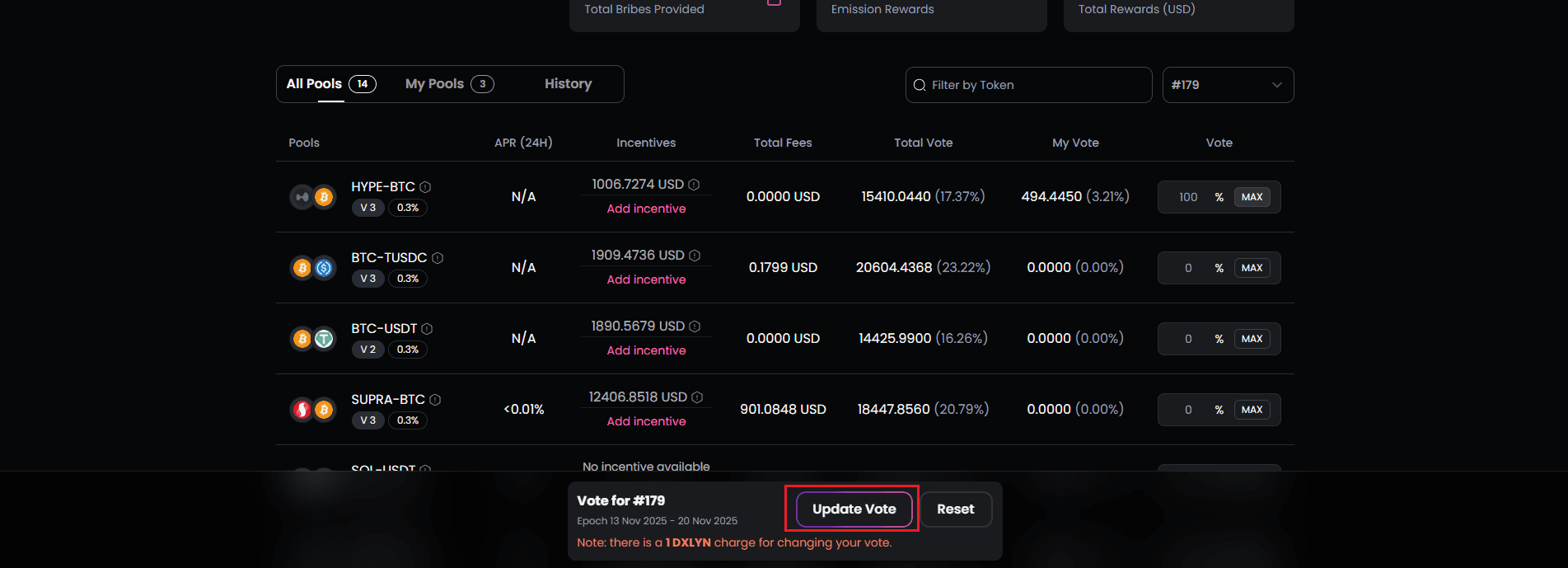
-
The voting interface appears with your current allocations displayed
-
Modify percentages as desired:
- Increase allocation to preferred pools
- Decrease or remove allocation from others
- Add votes to newly whitelisted pools
- Update Cost:
- You’ll be charged 1 DXLYN per update as an anti-spam measure
- This fee is in addition to network transaction fees
- The fee is burned or sent to the treasury (check protocol specifics)
- Confirm both transactions:
- First transaction: Pay the 1 DXLYN update fee
- Second transaction: Submit the new vote allocation
- Both must complete for the update to take effect
-
Your vote updates immediately for the current epoch
-
New emission reward estimates reflect your updated allocation
Update Limitations:
- Updates can only be made during an active epoch
- You cannot update after the epoch ends (wait for the new epoch)
- Each update costs 1 DXLYN regardless of how many pools you’re modifying